OmniVoice维吾尔语TTS在线webui文本转语音声音专版
维吾尔语TTS在线webui文本转语音声音专版
运行环境
框架版本
CUDA版本
12.8
应用
JupyterLab: 8888
支持卡型
3080TiRTX40系
+10
OmniVoice维吾尔语TTS在线webui文本转语音声音专版
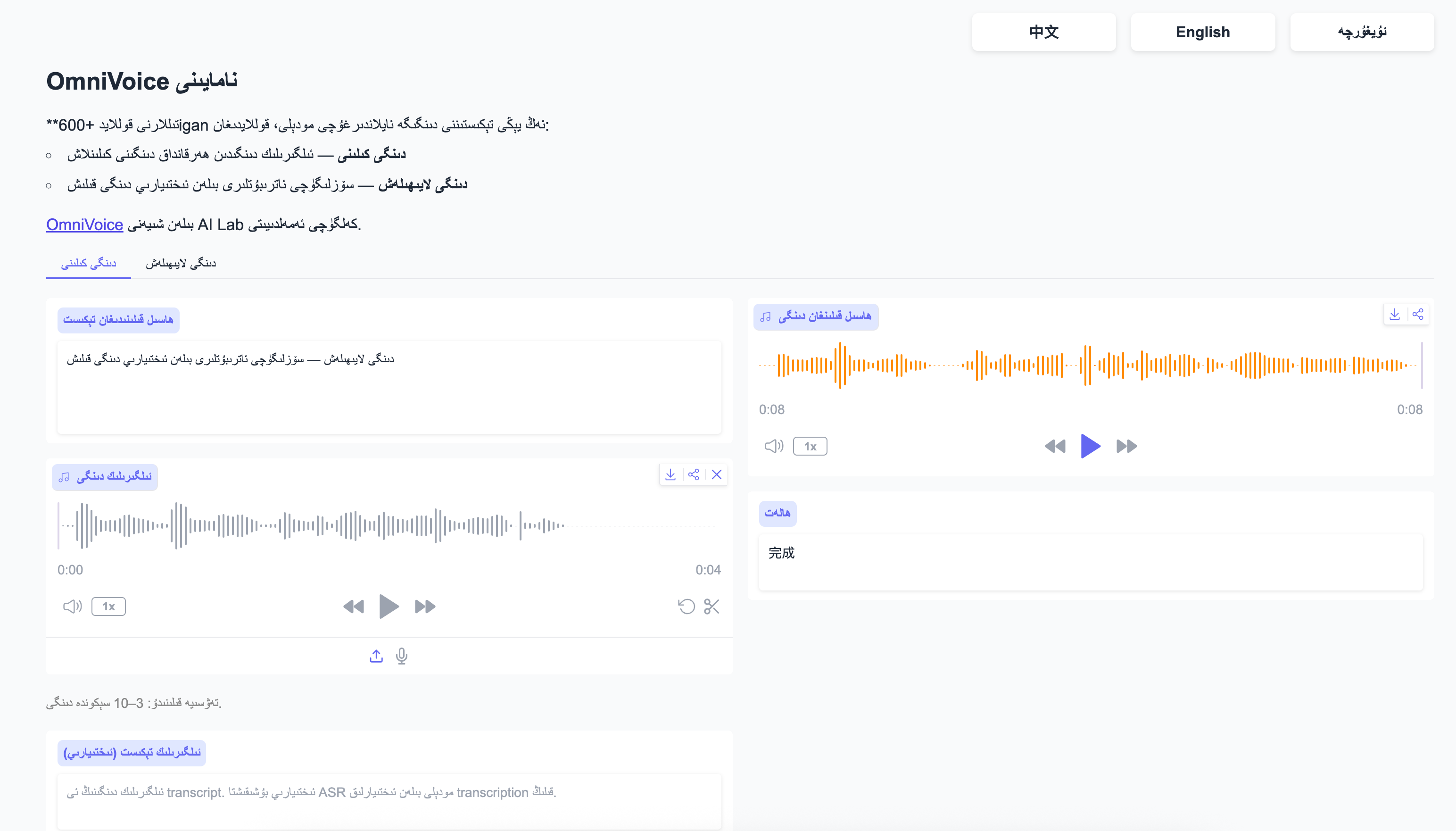
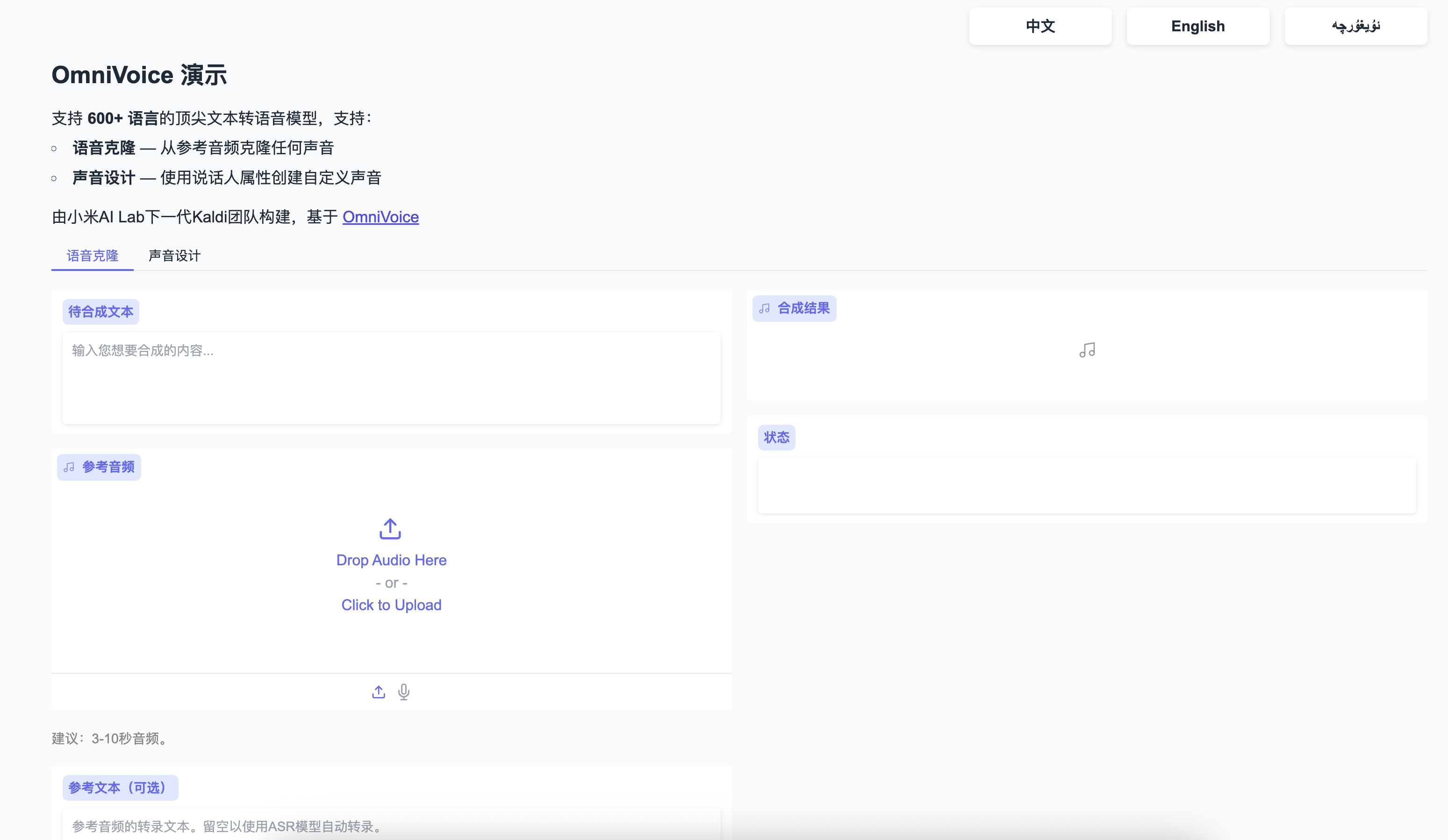
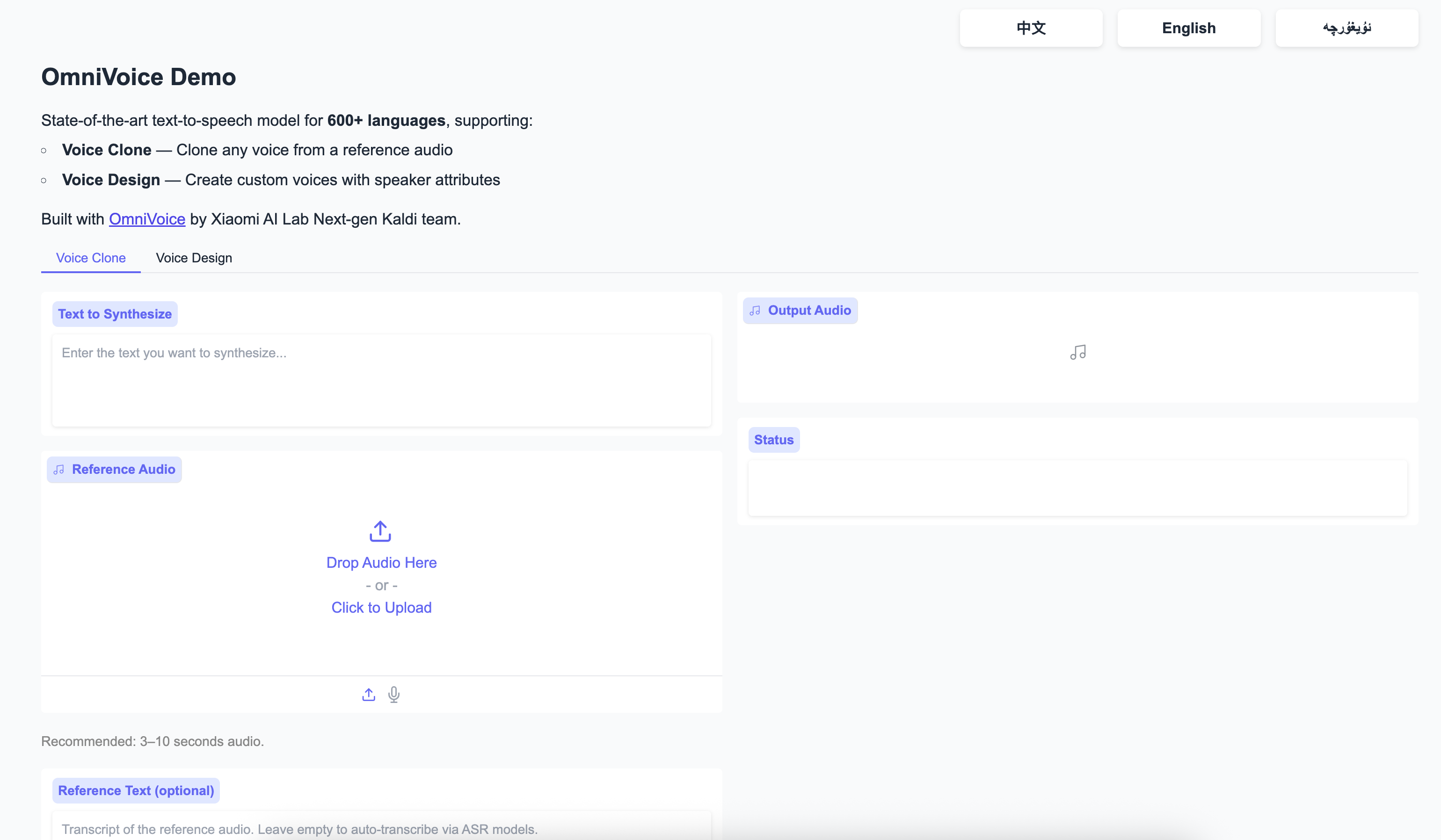
项目运行截图:
如何使用?
- 运行应用之后 打开【webui-6006】即可进入webui操作页面
OmniVoice 用户使用手册
项目简介
OmniVoice 是一个支持 600+ 语言的零样本 (Zero-shot) 文本转语音 (TTS) 模型。基于 Diffusion Language Model 架构,支持语音克隆和语音设计两种模式,推理速度 RTF 低至 0.025(比实时快 40 倍)。
目录
快速开始
环境要求
- Python 3.10+
- CUDA 12.1+ (GPU 推理)
- 最低 8GB 显存
安装
pip install omnivoice
启动 Web 界面
omnivoice-demo --port 8001
打开浏览器访问 http://localhost:8001 即可使用。
使用方式
方式一:Web 界面
启动命令:
omnivoice-demo --port 8001 --ip 0.0.0.0
功能说明:
| 模式 | 说明 |
|---|---|
| Voice Clone | 上传参考音频 + 转写文本,克隆音色 |
| Voice Design | 通过属性描述生成语音,无需参考音频 |
| Auto Voice | 完全自动选择音色生成 |
Web 界面使用步骤:
-
语音克隆模式:
- 选择
Voice Clone标签 - 上传 3-10 秒参考音频文件 (WAV/MP3)
- 输入参考音频的转写文本
- 输入要合成的目标文本
- 点击「生成」按钮
- 选择
-
语音设计模式:
- 选择
Voice Design标签 - 输入要合成的目标文本
- 选择或输入语音属性描述
- 点击「生成」按钮
- 选择
方式二:命令行工具
单条推理
语音克隆:
omnivoice-infer \
    --model k2-fsa/OmniVoice \
    --text "你好,欢迎使用 OmniVoice 文本转语音系统" \
    --ref_audio reference.wav \
    --ref_text "这是参考音频的转写文本" \
    --output output.wav
语音设计:
omnivoice-infer \
    --model k2-fsa/OmniVoice \
    --text "你好,欢迎使用 OmniVoice 文本转语音系统" \
    --instruct "female, young adult, Chinese accent" \
    --output output.wav
批量推理
准备 JSONL 文件:
{"text": "第一段文本", "ref_audio": "ref1.wav", "ref_text": "参考文本1"}
{"text": "第二段文本", "ref_audio": "ref1.wav", "ref_text": "参考文本1"}
{"text": "第三段文本", "instruct": "male, British accent"}
执行批量推理:
omnivoice-infer-batch \
    --model k2-fsa/OmniVoice \
    --test_list test.jsonl \
    --res_dir results/
方式三:Python API
import torch
import soundfile as sf
from omnivoice import OmniVoice

# 加载模型
model = OmniVoice.from_pretrained(
    "k2-fsa/OmniVoice",
    device_map="cuda:0",
    dtype=torch.float16
)

# ==================== 语音克隆 ====================
# 方式 1:分别传入参考音频信息
audio = model.generate(
    text="你好,欢迎使用 OmniVoice",
    ref_audio="reference.wav",
    ref_text="这是参考音频的转写文本"
)

# 方式 2:使用 VoiceClonePrompt 对象
prompt = model.create_voice_clone_prompt(
    audio="reference.wav",
    trans="这是参考音频的转写文本"
)
audio = model.generate(
    text="你好,欢迎使用 OmniVoice",
    voice_clone_prompt=prompt
)

# ==================== 语音设计 ====================
audio = model.generate(
    text="你好,欢迎使用 OmniVoice",
    instruct="female, young adult, moderate pitch"
)

# ==================== 指定语言 ====================
audio = model.generate(
    text="Hello, welcome to OmniVoice",
    instruct="female, American accent",
    lang="en"
)

# 保存音频
sf.write("output.wav", audio[0], 24000)
核心功能
语音克隆 (Voice Cloning)
通过提供少量参考音频,即可克隆任意音色。
输入要求:
- 参考音频时长:3-10 秒最佳
- 格式:WAV (推荐)、MP3
- 采样率:16kHz 或 24kHz
- 需要提供参考音频的转写文本
使用示例:
from omnivoice import OmniVoice

model = OmniVoice.from_pretrained("k2-fsa/OmniVoice")

prompt = model.create_voice_clone_prompt(
    audio="speaker_sample.wav",
    trans="The quick brown fox jumps over the lazy dog"
)

audio = model.generate(
    text="今天天气真好,我们一起去公园玩吧",
    voice_clone_prompt=prompt
)
语音设计 (Voice Design)
通过属性描述控制语音特征,无需参考音频。
可用属性:
| 属性类别 | 可选值 |
|---|---|
| 性别 (Gender) | male, female |
| 年龄 (Age) | child, teenager, young adult, middle-aged, elderly |
| 音调 (Pitch) | very low, low, moderate, high, very high |
| 风格 (Style) | whisper, reading, narration, conversation |
| 口音 (Accent) | American, British, Australian, Chinese, Japanese, German, French, ... |
| 中文方言 | 四川话, 陕西话, 东北话, 广东话, 上海话 |
使用示例:
# 英文合成
audio = model.generate(
    text="This is a synthetic voice created by OmniVoice",
    instruct="female, young adult, American accent, moderate pitch"
)

# 中文合成
audio = model.generate(
    text="你好,这是一个合成语音",
    instruct="female, young adult, Chinese accent"
)

# 指定年龄和风格
audio = model.generate(
    text="Once upon a time in a distant land...",
    instruct="elderly, male, storytelling style"
)

# 中文方言
audio = model.generate(
    text="你吃了早饭没得?",
    instruct="female, middle-aged, 四川话"
)
多属性组合:
instruct = "female, young adult, high pitch, cheerful, American accent"
audio = model.generate(text="Great job!", instruct=instruct)
高级功能
批量推理
支持多 GPU 并行批量处理大量文本。
准备数据文件 (JSONL 格式):
{"text": "第一条文本", "ref_audio": "ref.wav", "ref_text": "参考1", "output": "out1.wav"}
{"text": "第二条文本", "instruct": "female, British", "output": "out2.wav"}
{"text": "第三条文本", "ref_audio": "ref.wav", "ref_text": "参考1", "output": "out3.wav"}
执行批量推理:
omnivoice-infer-batch \
    --model k2-fsa/OmniVoice \
    --test_list test.jsonl \
    --res_dir results/ \
    --num_gpus 2
配置参数详解
生成配置可以通过 OmniVoiceGenerationConfig 调整:
from omnivoice.models.omnivoice import OmniVoiceGenerationConfig

config = OmniVoiceGenerationConfig(
    num_step=32,           # 扩散步数,16-64,越高质量越好好但更慢
    guidance_scale=2.0,     # CFG 尺度,1.0-5.0
    t_shift=0.1,           # 时间步偏移
    audio_chunk_duration=15.0,  # 长音频分块大小(秒)
    audio_chunk_threshold=30.0   # 触发分块的阈值(秒)
)

audio = model.generate(
    text="长文本内容...",
    ref_audio="ref.wav",
    ref_text="参考",
    config=config
)
参数说明:
| 参数 | 默认值 | 说明 | 调整建议 |
|---|---|---|---|
num_step | 32 | 扩散步数 | 实时合成可降至 16,质量优先可设 64 |
guidance_scale | 2.0 | Classifier-Free Guidance | 值越大越贴近 instruct,越小变化越多 |
t_shift | 0.1 | 时间步偏移 | 默认即可 |
layer_penalty_factor | 5.0 | 层采样惩罚 | 默认即可 |
position_temperature | 5.0 | 位置采样温度 | 默认即可 |
常见问题 (FAQ)
Q1: 模型加载失败怎么办?
问题: ConnectionError 或模型下载失败
解决:
# 设置 HuggingFace 镜像源
export HF_ENDPOINT="https://hf-mirror.com"

# 或在代码中
import os
os.environ["HF_ENDPOINT"] = "https://hf-mirror.com"
Q2: 显存不足怎么解决?
问题: CUDA out of memory
解决:
- 减少 batch size
- 使用
dtype=torch.float16 - 设置
device_map="cuda:0"而不是"auto" - 降低
num_step至 16
model = OmniVoice.from_pretrained(
    "k2-fsa/OmniVoice",
    device_map="cuda:0",
    dtype=torch.float16  # 半精度节省显存
)
Q3: 如何处理长文本?
问题: 文本太长内存不足
解决: OmniVoice 会自动分块,但建议:
- 单次不超过 500 字符
- 长文本预先用
\n分割成段落
# 自动处理
audio = model.generate(text="很长的文本...")

# 手动分段落处理
paragraphs = text.split("\n")
for i, para in enumerate(paragraphs):
    audio = model.generate(text=para, ...)
    sf.write(f"output_{i}.wav", audio[0], 24000)
Q4: 语音克隆效果不理想?
排查步骤:
- 参考音频质量:确保清晰、无噪声、无音乐背景
- 参考音频时长:3-10 秒最佳,太短或太长都不好
- 转写文本:确保准确,与音频内容完全匹配
- 调整参数:增大
guidance_scale至 3.0-4.0
config = OmniVoiceGenerationConfig(guidance_scale=3.5)
audio = model.generate(text="...", voice_clone_prompt=prompt, config=config)
Q5: 支持哪些音频格式?
支持格式:
- 输入:WAV, MP3, FLAC, OGG
- 输出:WAV (24kHz, 16-bit)
Q6: 如何控制发音?
问题: 某些字词发音不准确
解决: 使用拼音标注
# 在文本中用 | 分隔多音字候选
text = "银行(yín háng)存款"

# 或使用音标直接指定
text = "important [ɪmˈpɔːtənt]"
Q7: 如何插入笑声、叹息等声音?
支持的非语言符号:
[laughter]- 笑声[sigh]- 叹息[breath]- 呼吸声[cough]- 咳嗽[neck_breath]- 咽呼吸
text = "你好[laughter],见到你真高兴[sigh]"
audio = model.generate(text=text, ...)
Q8: 如何指定输出语言?
问题: 自动检测不准确
解决: 手动指定语言代码
# 通过 lang 参数指定
audio = model.generate(
    text="This is English text",
    lang="en"  # 语言代码
)

# 或在 instruct 中指定口音
audio = model.generate(
    text="Bonjour",
    instruct="female, French accent"
)
常用语言代码:
| 代码 | 语言 |
|---|---|
zh | 中文 |
en | 英语 |
ja | 日语 |
ko | 韩语 |
es | 西班牙语 |
fr | 法语 |
de | 德语 |
ar | 阿拉伯语 |
Q9: 推理速度慢怎么优化?
优化建议:
- 使用 GPU 推理
- 降低
num_step至 16 - 批量处理时使用多 GPU
# 最快配置
config = OmniVoiceGenerationConfig(num_step=16)
audio = model.generate(text="...", config=config)
Q10: Web 界面无法访问?
排查:
- 检查防火墙设置
- 确认端口未被占用
- 使用
--ip 0.0.0.0允许远程访问
# 检查端口占用
lsof -i :8001

# 更换端口
omnivoice-demo --port 8080 --ip 0.0.0.0
技术规格
| 指标 | 数值 |
|---|---|
| 支持语言 | 600+ |
| 参考音频长度 | 3-10 秒 |
| 输出采样率 | 24kHz |
| RTF (实时因子) | 0.025 (40x 实时) |
| 最小显存 | 8GB |
| 最大输入长度 | ~1000 字符 |
技术支持
- 问题反馈:https://github.com/kegeai888/OmniVoice-webUI/issues
- 模型下载:https://huggingface.co/k2-fsa/OmniVoice
文档版本:v1.0 | 更新日期:2026-04-24
 认证作者
认证作者